Explore
AI-native development · AI process automation

Let AI agents do the copy-paste inside the tools you already use

For operations teams retyping invoices, assembling reports or chasing approvals by email. We map one workflow with your people and build the software that takes it over. Rules handle the predictable steps. A model reads messy input. Where the next step depends on what it finds, an AI agent does the work in your tools: it looks up the order, drafts the entry in QuickBooks, updates HubSpot and posts the exception in Slack. It gets only the permissions that step needs, and your people approve the actions you choose. You get working code and instructions for running it.

  • 130+People, remote across Poland
  • 44 daysFirst line of code to live, one consumer product
  • 5.0Clutch rating, 11 reviews

This is for you if you have a repeatable operational bottleneck

  • Invoices get entered twice

    Someone reads an invoice from email, types it into QuickBooks and checks the same details again before approval.

  • A weekly report eats up the week

    Your team pulls numbers from different systems and spends more time reconciling them than using the report.

  • Your scripts stop at the first exception

    A script repeats the exact steps it was given. When a PDF changes format or an integration times out, the unfinished task gets lost in an inbox.

  • Approvals need to stay with your team

    You want an agent to prepare the action and a named person to approve it before money moves or a message leaves.

What you get. Agents and automations with clear boundaries

A workflow map built with your team

We map the work with the person who does it, the process owner and whoever answers for finance, IT or security. Inputs, tools and approval points end up in one document, including who handles missing information and failed runs.

AI agents that take actions, not just scripts

Where the next step depends on what the input says, an agent looks things up and acts in your tools. It matches the invoice to the order, drafts the entry, updates the CRM and flags what it is unsure about. Each agent gets only the permissions its step needs, with limits on cost and retries.

Software connected to your existing tools

Connect Microsoft 365, Google Workspace, your CRM, accounting tools and internal systems through the integrations the workflow needs. We can bridge on-premise and cloud systems while keeping your source data and approval responsibilities in place.

A record of each run

Track what came in, which action ran and who approved it. Incomplete work has a route back to a person.

Code and operating instructions you keep

The implementation runs in your accounts. You receive the code, configuration and instructions for investigating failures or completing a task by hand.

A measured result to fund the next process

We measure the task before and after, including review and corrections. When the first process gives your team real time back, that time can pay for having us automate the next one. You decide with numbers from your own workflow.

One process, step by step

  • Read the invoice

    The agent picks up supplier invoices from the inbox in Gmail and reads what each one says.

  • Match it with the records

    It compares every invoice with the purchase records in SharePoint and marks what does not match.

  • Propose the entry

    It drafts the entry for the books, with the invoice and the matching records attached.

  • A person approves

    An accountant reviews the proposal and approves or corrects it. Nothing reaches the books before that.

  • Write only what was approved

    The agent writes the approved entry to QuickBooks Online, within the access it was given.

  • Count what it saves

    From the first month we track manual hours, time from start to finish and exceptions, and compare them with the cost of building and running it.

Tech stack. Agents and workflows with a human in the loop

We work across stacks: Azure and Microsoft 365, Google Workspace, macOS and Windows, on-premise systems and cloud services on AWS, Azure and Google Cloud. We connect through APIs, MCP servers, scripts or desktop automation where needed. Predictable actions use rules. Text and documents go to a model when interpretation is needed. An agent with tools is used only where the next step depends on what it finds, and every write it makes passes the checks your team agreed. Access, licensing and deployment constraints are checked before we agree the pilot.

Tech stack

  • Microsoft 365
  • Power Automate
  • Azure Logic Apps
  • Microsoft Graph
  • SharePoint
  • Microsoft Teams
  • Google Workspace APIs
  • Google Apps Script
  • Slack API
  • HubSpot API
  • Anthropic API
  • OpenAI API
  • Model Context Protocol (MCP)
  • Claude Agent SDK
  • OpenAI Agents SDK
  • LangChain
  • Playwright
  • UiPath
  • n8n
  • Zapier
  • Temporal
  • Node.js
  • Python
  • PowerShell
  • PostgreSQL
  • AWS
  • Microsoft Azure
  • Google Cloud
  • Docker
  • Windows

How we work

Map it together, then follow the work through its exceptions

This is hard work, and it does not get done in a slide deck. Data entry, document handling and approvals look simple until you sit next to the person doing them. So the analysis is a joint effort from the first call: the person who does the task, the process owner and someone from finance, IT or security, working with our engineers. Our software delivery experience spans fintech, edtech, medtech, energy, real estate and the public sector. We use that context to ask better questions, then check every rule and exception with the people who run the work. We watch how a task moves through your tools before deciding which steps need rules, a model or an agent. We agree the pilot schedule after checking data access and integrations, and you review the scope, acceptance criteria and expected running costs before implementation.

What stayed with me was the communication. Fast, clear, and always with something concrete - a proposal, an update, a solution. We never had to wonder what was happening.

Katarzyna MoszczyńskaHead of Science Department, WSB Merito
  1. Map a real task with the people who do it

    The person who does the task walks us through an ordinary request and an exception, with the process owner and whoever answers for IT, security or finance on the call. You get a written scope showing what stays in your tools, which steps go to rules, a model or an agent, and which manual steps we would replace.

  2. Agree the pilot before work starts

    You approve the workflow, what each agent is allowed to do, the access rules and the acceptance criteria. The proposal sets the price and schedule, including an estimate of monthly hosting, model use and maintenance.

  3. Build and test the whole workflow

    We connect the agreed systems and test missing inputs, duplicate requests, failed writes and an agent that is unsure. Your team reviews results as they come in, not at the end. You get a working pilot in your accounts, with approval points and a record of each run.

  4. Measure it and pick the next process

    Compare the time to an accepted result with the original process, including review and corrections. If the first process gives real time back, that time can fund the next one. You keep the code and operating instructions, then decide whether to automate the next process with us or run it with your own team.

Proof, not promises

Featured
EdTech · AI
Elite Medical Prep · USA

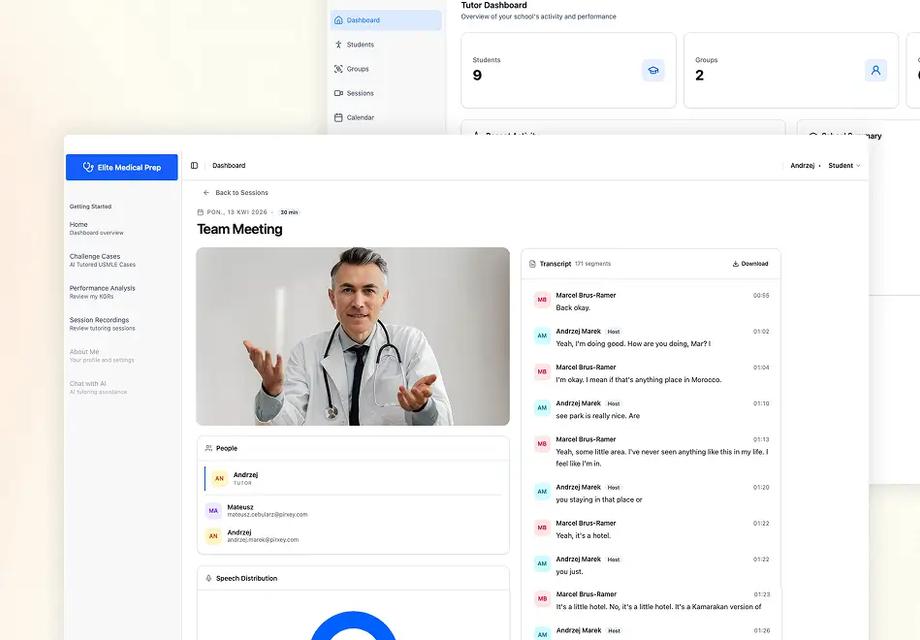
AI-powered medical tutoring for Elite Medical Prep

2 mo broken codebase to deployed
Read
AI · FinTech
Signal Mesh · USA

Taking over a crypto platform no one else could ship

Questions about automating operational work

  • With a 30-minute scoping call. We look at what you have and what you need, then propose a first step with its scope and price before any work starts.
  • Five questions decide it. Are the steps the same every week? Are the rules mostly written down? Are the inputs digital? Is a wrong output survivable with a human check? Does the volume matter? Five yes answers: automate. Four: a pilot with a person signing off. Three or fewer: fix the basics first, because automating confusion only makes it faster. Then pick the tool for each step: rules for what is predictable, a model for messy input, an agent only where the next step depends on what it finds.
  • The first conversation and a limited written scope are free. Implementation is a paid pilot covering one process, with a fixed scope and price agreed before we start. The scope also estimates monthly hosting, model usage and maintenance. Volume and the number of exceptions affect that estimate, so you compare the running cost with the manual process before you approve.
  • We set the schedule after reviewing the task, sample inputs and access to the systems it touches. The proposal names the pilot end date and what must be ready before work starts. A later rollout is scoped from the pilot results.
  • More people than you might expect, at least for a few hours each. The person who does the task every week, the process owner who decides what counts as done, and someone who can answer for access, security and finance. Most of the hard questions come up during the analysis, not the build: which exceptions are real, who approves what, which data a model may see. Skip those people and the automation follows a process that exists only on paper.
  • We build around the tools you already use when their integrations support the workflow. The scope says which systems stay and where a change is needed. If an existing product fits the task, we recommend that first.
  • You choose the actions that require approval and the person who reviews them. An agent gets only the permissions its step needs, with limits on cost, tool calls and retries. A failed or uncertain run is recorded for retry or manual handling. A model reading an invoice does not by itself authorize a payment.
  • You do. We build in your accounts and hand over the code, configuration and operating instructions. You can run the workflow with your team or agree continued support with us.
  • It can, and that is how we suggest planning it. Measure the current task before the pilot, then measure the time to an accepted result with the automation, including checks and corrections. A faster model response alone does not show that the whole process improved. If the measured time back covers it, you put it toward automating the next process with us. We won't promise that number up front: it depends on your volume and your exceptions, which is why we measure.
  • Yes, every day. Since May 2026 we have run an assistant that works across 25 of our own tools (Slack, Gmail, HubSpot, ClickUp, GitHub and more) with each person's own logins. Our first PirxeyOS module replaced the time tracker for about 150 people: one developer working with AI built the first working version in about 20 working days, and we published the commit history of the 30 weeks that followed, fixes and migrations included. Both are our own company, not client results. We have not yet published a client case for this type of operations automation.
  • A script runs the same steps every time and stops when something unexpected shows up. An agent reads the situation and picks the next lookup or action: find the matching order, check the customer in HubSpot, draft the entry, ask a person when it is unsure. That flexibility costs more per item and needs tighter limits, so we use an agent only where a rule or a single model call won't do the job. Its writes go through checks in code and the approvals you set.

How we think about this, in our own words

Interactive briefs and articles by our team, picked for this service

AI workflow automation playbook

Design one workflow with rules, a model or an agent, compare modeled cost and review time, and leave with a concrete pilot plan.

Read the brief

PirxeyOS: 20 days to build, 30 weeks to keep alive

The build and ongoing maintenance of our own internal tool that replaced a SaaS: 587 commits across the whole log, 46% of them fixes.

Read the brief

AI Agents Are Not Just Changing Tools. They Are Redefining Accountability

What happens to accountability when an AI agent starts executing work instead of assisting it, and why approval steps matter.

Read the article

Pirxey World: our second brain

How each person's assistant works across 25 of our tools with their own logins, which questions it answers and what it still can't reach.

Read the brief

Bring us the task your team keeps repeating

Additional details (optional)

We reply within one business day.

Pirxey will process your data to answer your inquiry. Details in our Privacy Policy.